Review Platform Integration Overview

You can streamline the eDiscovery workflow by integrating Reef ECA with Reef Review, Relativity Server, or both.

Review Integration Features

Review platform integration offers the following features and benefits:

  • Each Reef Express or Reef ECA system can be integrated with Reef Review, Relativity Server, or both by configuring the needed connections to the target review systems.

  • Data in a review-integrated Project , whether ingested by Reef ECA or uploaded using Reef Express, can be promoted directly to a connected review system, eliminating the need for third-party promotion software such as Relativity Desktop Client or hosting tools, saving time, and reducing the risk of error associated with interim steps. The user also has the option of creating a standard Export Stream to a Reef ECA export data area.

  • The progress of each promotion can be tracked in real time, and when it is complete the target review project can be opened on the review system directly from Reef Express or Reef ECA.

  • On review-integrated Reef Express and Reef ECA systems, any Project can be created either as review-integrated, allowing it to be associated with one or more review projects on a connected review system, or as Reef ECA only at the user's option. Similarly, when exporting data from a review-integrated Project, the user has the option of promoting it to the review system or creating a standard export stream to a Reef ECA export data area.

  • Review-integrated Reef ECA Projects can be associated with review system projects on a many-to-many basis. This provides the flexibility to range from simple Project-to-project relationships to distribution of one Reef ECA Project's data among multiple review projects or aggregation of data from multiple Reef ECA Projects, Organizations, or even systems in a single review project.

  • When a review project is associated with a Reef ECA Project, a dedicated Export Data Area for the review project is generated, and is automatically selected when the User promotes data to that review project.

  • User and Group Project membership in a review-integrated Reef ECA Project is dynamically and transparently replicated in all associated review projects, including the creation of users and groups on the review system as needed.

  • When associating a new Reef ECA Project with one or more review projects, the user has the option of creating a new review project or selecting from among the existing projects to which they have access. Additional review projects can be associated at any time.

  • When associating a Project with a Reef Review project,the user can select an existing template from which to create the Reef Review project.

Review Integration Workflows

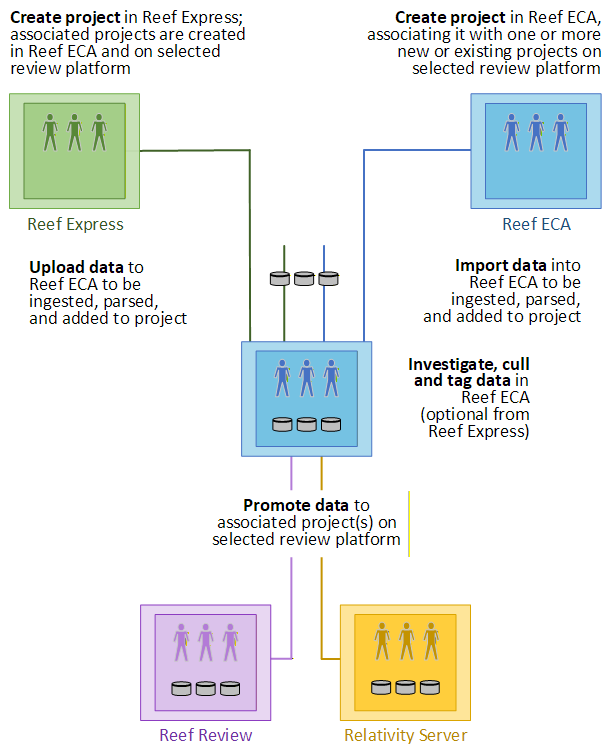
There are two workflows for creating a review-integrated Reef ECA Project, associating it with one or more projects on a configured review system, and promoting its data from Reef ECA to the review system — one originating in Reef ECA and the other in Reef Express.

Originating in Reef ECA

A review-integrated Project is created and members added in Reef ECA, with the user determining which new or existing review projects the new Project is associated with. The data is imported into Reef ECA, deduplicated and parsed, and contained in new Data Sets representing the Project Data. When selected data is ready to be promoted to review, a new review system Export Stream is created, with the user specifying which associated review project to promote to. When all of the exported data has been written to the dedicated Export Data Area for the selected review project, the review system begins ingesting it into the project. Promotion can be tracked in real time, and when it is complete, the review project can be opened in the review platform from Reef ECA.

Originating in Reef Express

A review-integrated Project is created and members added in Reef Express, which causes a parallel Project to be created both in Reef ECA and on the configured review system. As new Data Sets are created, they are uploaded to Reef ECA and imported into the parallel Project there. When data is ready to be promoted, it is exported directly into the parallel review project . When promotion is complete, the review project can be opened in the review platform from Reef Express or Reef ECA.

The Reef Express user also has the option of having each the Data Set ingested by Reef ECA for deduplication and parsing and then automatically promoted to the review system.

These workflows are illustrated by the following:
Review Integration Tasks

The following specific tasks, performed by various users, are required to create and use a review-integrated Project in Reef ECA:

  1. A System User in the IT Administrator or System Administrator role obtains the needed connection information and configures the review system(s).

  2. With the review system(s) successfully configured, any User creating a creating a new Project can select the Reef ECA and Reef Review or Reef ECA and Relativity Server option and associate the new Project with either a new review system project or one or more existing review projects.

  3. On the Home page, Projects page, and Project dashboard these review-integrated Projects are identified by the Reef Review icon () or Relativity icon () after the Project name.

  4. Users create new Data Sets and investigate, cull, and tag data as in any Reef ECA Project.

  5. When users are ready to promote data to the review system, they use the New Reef Review Export Stream or New Relativity Server Export Streamoption to creats a new Export Stream, specifying the associated review project to promote to (if necessary) and choosing a folder within the review project's dedicated Export Data Area.

  6. When the export is complete, data ingestion by the review system begins. While the Project promotion process is ongoing, the user can track its progress with the Review Promotion Tracker option on the Project dashboard drop-down menu. The tracker can be set to send a notification email when the promotion job has completed (successfully or unsuccessfully).

  7. Following successful promotion, the user can access the project and its data on the review system by selecting the Open in Reef Review or Open in Relativity option on the Project dashboard drop-down menu.

  8. If a review-integrated Project is associated with multiple review system projects, any data in the Project can be promoted to any or all of them in separate promotion operations.